v1.0 · macOS, Windows, Linux

Turn audio into accurate transcripts.

Cross-platform desktop app. Drag-drop audio or video — get clean text, speaker labels, and timestamps in minutes.

Live transcript
routing
  • 00:01 HOST Welcome back to the show — today we're talking pipelines.
  • 00:04 GUEST Yeah, the new transcription model is wild.
  • 00:06 HOST Speakers detected automatically, right?
  • 00:09 GUEST Auto-diarised, timestamped, exportable.
  • 00:12 HOST And it runs locally on the desktop app?
  • 00:14 GUEST Drag, drop, done.

Features

Built for serious transcription work.

Not a wrapper around a free API tier. Real export formats, real speaker diarisation, real word-level timestamps.

Drag, drop, done

Every common format — audio + video.

MP3, WAV, M4A, AAC, FLAC, OGG on the audio side. MP4, MOV, AVI, MKV, FLV, WMV, WebM on the video side. Whisperline pulls the audio track, ships it through transcription, and hands you back text.

  • No file-size cap — streamed locally
  • Multi-track audio handled
  • Lossless extraction, no quality loss

Speaker diarisation

Who said what, automatically.

Two-person podcasts. Five-person panel discussions. Court depositions. Whisperline labels each speaker as it goes — and lets you rename them in one click before exporting.

  • Auto-labelled speaker turns
  • Rename in-place
  • Up to 8 speakers supported

Export anywhere

TXT, SRT, VTT, JSON, plus copy-to-clipboard.

Subtitles for YouTube. Closed captions for streaming. Plain text for blog posts. Structured JSON for whatever you're building next. Every export ships with word-level timestamps if you want them.

  • Word-level timestamps
  • Subtitle-ready SRT + VTT
  • Drop-in JSON schema

How it works

Three steps. About a minute of fuss.

From a fresh recording on your desk to a clean transcript in your clipboard — no command line, no subscription. Just a free AssemblyAI key, pasted once.

  1. 01

    Drop the file

    Drag an audio or video file into the app. Whisperline detects format, length, and channel count instantly. No prep, no preset to pick.

  2. 02

    Watch it transcribe

    Live progress bar with ETA. The transcript starts populating before processing finishes — you can scroll, edit, and tag while it runs.

  3. 03

    Export and ship

    Copy, save as TXT, generate subtitles, or pull JSON for your pipeline. The original media stays on your machine the entire time.

The real app

Not a mockup. This is the app.

Local-first, zero telemetry, and quietly fast. Download it free and run a short clip before you ever think about a licence.

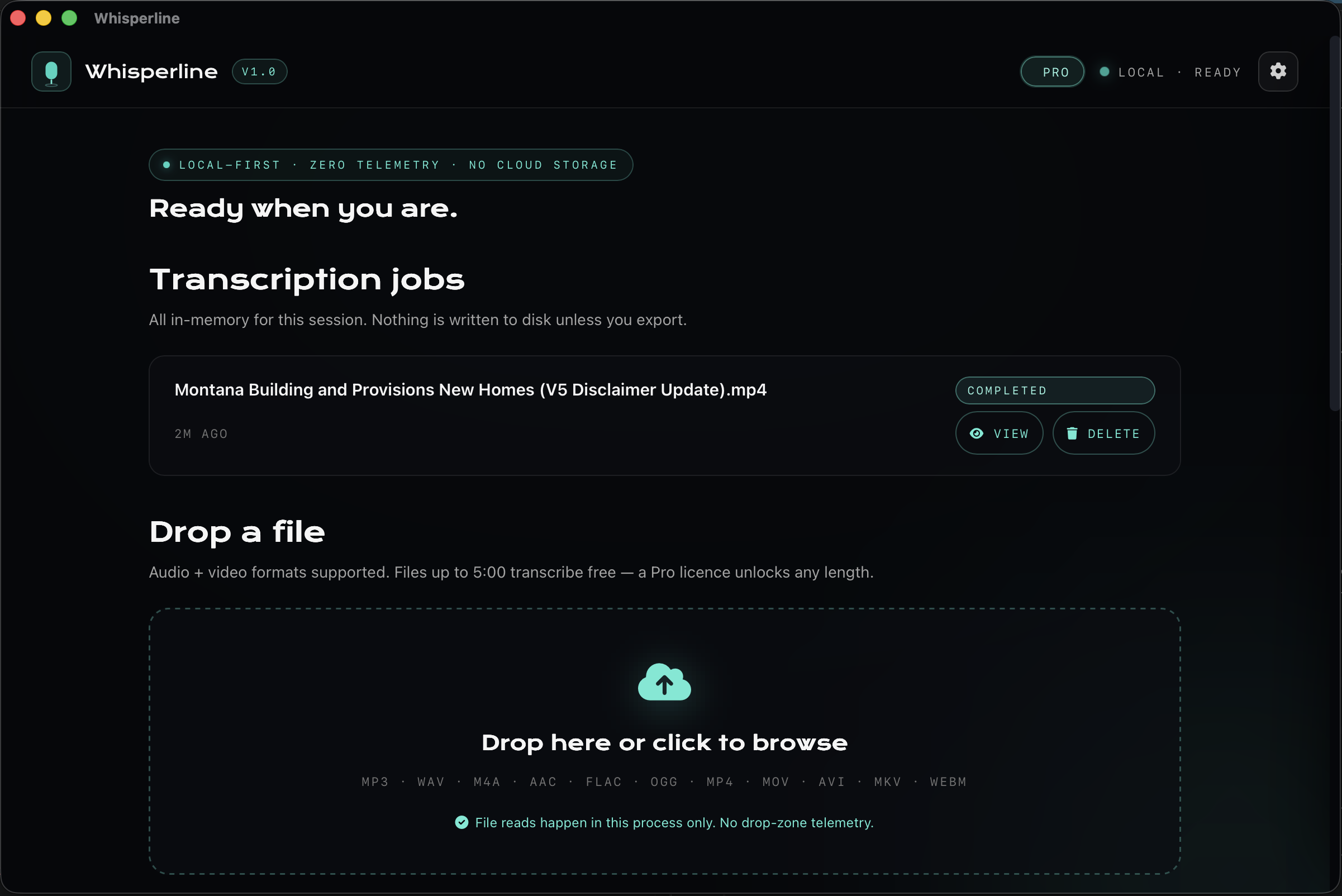
Whisperline desktop app — drag-drop area with a completed transcription job and the Pro licence active
Drag a file in. Jobs run locally, transcripts stay in-session until you export.
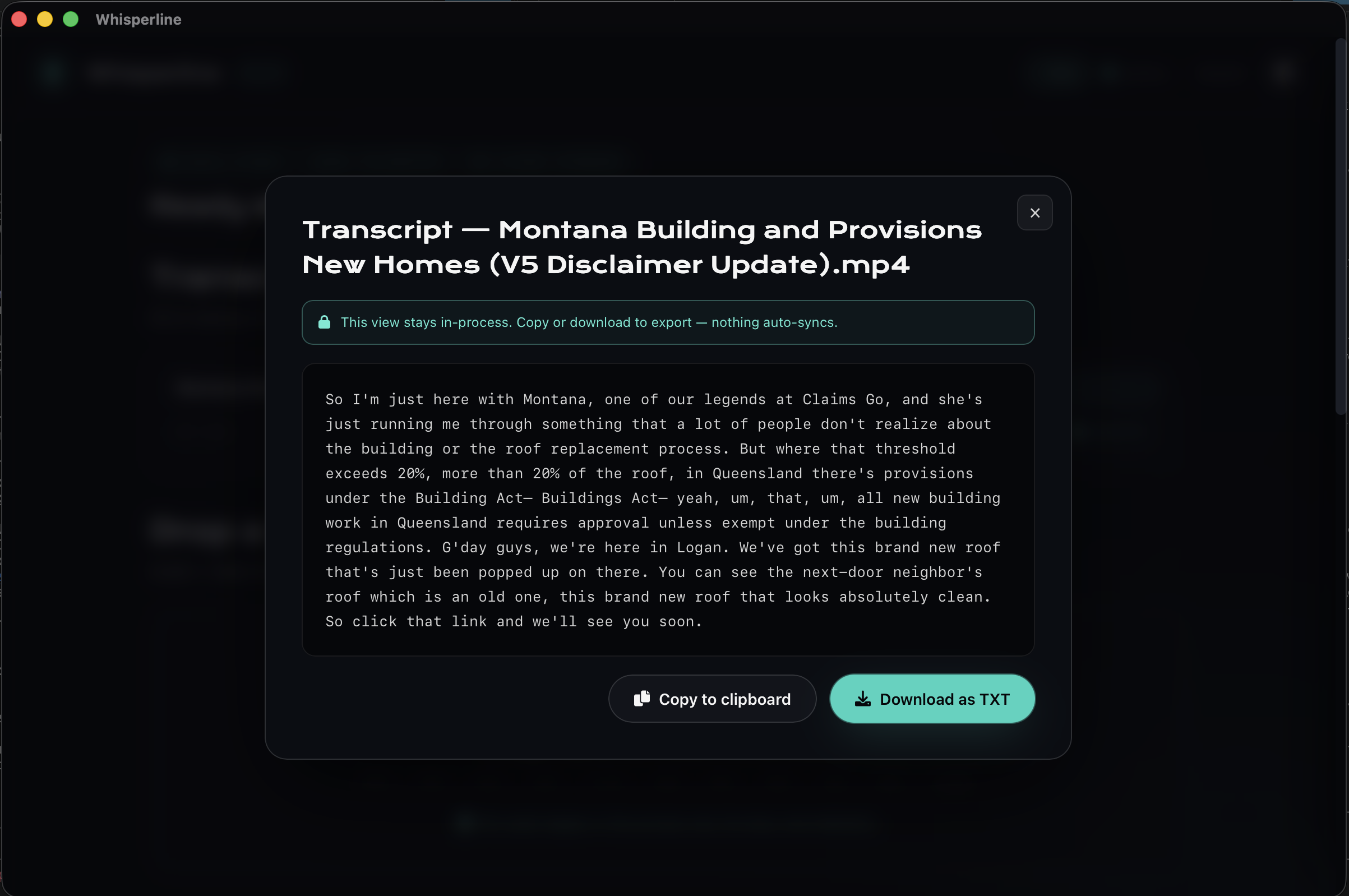
Whisperline transcript view — clean text with copy-to-clipboard and export-to-TXT actions
Clean transcript, ready to copy or export. Nothing auto-syncs anywhere.

Pricing

Pay once. Own the app.

One-time licence. No subscription. No quota tier. No hidden upgrade lock-in.

Best value

Whisperline

Recommended
$49 + GST one-time

Everything unlocked the moment you launch it. Run it on every machine you own.

  • Lifetime licence — buy once, own forever
  • Every v1 update included, no upgrade fee
  • Drag-drop transcription, audio + video
  • Speaker diarisation with rename
  • Word-level timestamps
  • Export to TXT, SRT, VTT, JSON, copy
  • Any length, any file size — no caps
  • macOS, Windows, Linux universal
  • Email support
Buy Whisperline — $49 Download free

Free to download. You'll add your own free AssemblyAI key on first launch — a one-minute signup, no card. Short clips then transcribe with no licence.

One-time purchase. 14-day refund. No telemetry. Prices in AUD, exclusive of GST — Australian customers see $49 + 10% GST at checkout. International customers pay AUD only, no tax added.

FAQ

The honest answers.

Where does the audio actually get transcribed?
The current build sends the audio to AssemblyAI for the actual speech-to-text pass — they've got the best diarisation in the market right now. Your file is uploaded over TLS, transcribed, then their copy is deleted within 24 hours. Your original media never leaves your machine after the upload completes.
Is it free to try?
Yes — files up to five minutes transcribe free, no Whisperline licence required. You'll just need a free AssemblyAI key (a one-minute signup at assemblyai.com, no card) since that's what does the actual speech-to-text — paste it into Settings once. A one-time Pro licence then lifts the length limit so you can run anything.
Do I need my own API key?
Yes — Whisperline is bring-your-own-key, and the signup takes about a minute. Grab a free key at assemblyai.com (no card needed), paste it into Settings once, and you're set. It's stored locally and only ever talks to AssemblyAI. That's how the app stays a flat one-time price with no per-minute markup, no middleman, and no telemetry.
How big a file can it handle?
There's no hard size cap — files stream straight to transcription, so multi-gigabyte video is fine. The free tier covers shorter clips; a Pro licence removes the length limit entirely.
Is it actually a desktop app or just a wrapper?
It's a native desktop app built on Tauri — that's Rust + the OS's built-in webview. macOS gets a real .app bundle, Windows gets a signed .msi, Linux gets an .AppImage. Total binary is around 12MB, not the 150MB Electron monstrosity you're used to.
How does the licence work?
One-time purchase. The licence key works on every machine you own (within reason — Australian Consumer Law fair-use, not a 17-machine office). Ed25519-signed, verified offline, no phone-home.
Refund policy?
14 days, no questions. Email hi@aidxn.com with your order number and we'll refund within the same business day.